Chapter 13 Design A Search Autocomplete System
When searching on Google or shopping at Amazon, as you type in the search box, one or more matches for the search term are presented to you. This feature is referred to as autocomplete, typeahead, search-as-you-type, or incremental search. Figure 13-1 presents an example of a Google search showing a list of autocompleted results when “dinner” is typed into the search box. Search autocomplete is an important feature of many products. This leads us to the interview question: design a search autocomplete system, also called “design top k” or “design top k most searched queries”.
当你在谷歌上搜索或在亚马逊购物时,在搜索框中输入,会有一个或多个与搜索词相匹配的内容呈现给你。这一功能被称为自动完成、提前输入、边输入边搜索或增量搜索。图13-1是谷歌搜索的一个例子,当在搜索框中输入"dinner"时,显示了一个自动完成的结果列表。搜索自动完成是许多产品的一个重要功能。这就把我们引向了面试问题:设计一个搜索自动完成系统,也叫 "设计 top k "或 "设计 top k 搜索最多的查询"。

1 Step 1 - Understand the problem and establish design scope
The first step to tackle any system design interview question is to ask enough questions to clarify requirements. Here is an example of candidate-interviewer interaction:
Candidate: Is the matching only supported at the beginning of a search query or in the middle as well?
Interviewer: Only at the beginning of a search query.
Candidate: How many autocomplete suggestions should the system return?
Interviewer: 5
Candidate: How does the system know which 5 suggestions to return?
Interviewer: This is determined by popularity, decided by the historical query frequency.
Candidate: Does the system support spell check?
Interviewer: No, spell check or autocorrect is not supported.
Candidate: Are search queries in English?
Interviewer: Yes. If time allows at the end, we can discuss multi-language support.
Candidate: Do we allow capitalization and special characters?
Interviewer: No, we assume all search queries have lowercase alphabetic characters.
Candidate: How many users use the product?
Interviewer: 10 million DAU. (Daily Active Users)
解决任何系统设计面试问题的第一步是提出足够多的问题来阐明需求。 这是候选人与面试官互动的示例:
候选人:是否只支持在搜索查询的开始阶段进行匹配,还是在中间也支持?
面试官:只有在搜索查询的开始阶段。
候选人:系统应该返回多少个自动完成的建议?
面试官:5
候选人:系统如何知道要返回哪5条建议?
面试官:这是由受欢迎程度决定的,由历史查询频率决定。
应聘者:系统是否支持拼写检查?
面试官:不,不支持拼写检查或自动更正。
候选人:搜索查询是用英语吗?
面试官:是的。如果最后时间允许,我们可以讨论多语言支持。
候选人:我们允许大写字母和特殊字符吗?
面试官:不,我们假设所有的搜索查询都是小写字母。
候选人:有多少用户使用该产品?
面试官:1000万DAU。
Requirements:
Here is a summary of the requirements:
-
Fast response time: As a user types a search query, autocomplete suggestions must show up fast enough. An article about Facebook’s autocomplete system[1] reveals that the system needs to return results within 100 milliseconds. Otherwise it will cause stuttering.
-
Relevant: Autocomplete suggestions should be relevant to the search term.
-
Sorted: Results returned by the system must be sorted by popularity or other ranking models.
-
Scalable: The system can handle high traffic volume.
-
Highly available: The system should remain available and accessible when part of the system is offline, slows down, or experiences unexpected network errors.
以下是对要求的总结:
- 快速的响应时间:当用户输入搜索查询时,自动完成的建议必须足够快地显示出来。一篇关于Facebook自动完成系统的文章[1]显示,该系统需要在100毫秒内返回结果,否则会造成卡顿。
- 相关性:自动完成的建议应该与搜索词相关。
- 已排序:系统返回的结果必须按受欢迎程度或其他排名模式进行排序。
- 可扩展性:该系统可以处理高流量。
- 高度可用:当系统的一部分脱机、速度减慢或遇到意外的网络错误时,系统应保持可用和可访问。
1.1 Back of the envelope estimation
-
Assume 10 million daily active users (DAU).
-
An average person performs 10 searches per day.
-
20 bytes of data per query string:
-
Assume we use ASCII character encoding. 1 character = 1 byte
- Assume a query contains 4 words, and each word contains 5 characters on average.
-
That is 4 x 5 = 20 bytes per query.
-
For every character entered into the search box, a client sends a request to the backend for autocomplete suggestions. On average, 20 requests are sent for each search query. For example, the following 6 requests are sent to the backend by the time you finish typing "dinner".
search?q=d
search?q=di
search?q=din
search?q=dinn
search?q=dinne
search?q=dinner
- ~24,000 query per second (QPS) = 10,000,000 users * 10 queries / day * 20 characters / 24 hours / 3600 seconds.
- Peak QPS = QPS * 2 = ~48,000
- Assume 20% of the daily queries are new. 10 million * 10 queries / day * 20 byte per query * 20% = 0.4 GB. This means 0.4GB of new data is added to storage daily.
- 假设有1000万日活跃用户(DAU)
- 一个人平均每天进行10次搜索。
- 每个查询字符串有20字节的数据。
- 假设我们使用ASCII字符编码。1个字符=1个字节
- 假设一个查询包含4个词,而每个词平均包含5个字符。
- 也就是说,每次查询有 4×5=20个字节4×5=20个字节。
- 对于在搜索框中输入的每个字符,客户端都会向后端发送请求以获取自动完成建议。 平均而言,每个搜索查询会发送 20 个请求。 例如,当您输入完 "dinner" 时,以下 6 个请求将发送到后端。 1.
search?q=d2.search?q=di3.search?q=din4.search?q=dinn5.search?q=dinne6.search?q=dinner- QPS≈24,000次/秒=10,000,000用户×10次/天×20个字符/24小时/3600秒QPS≈24,000次/秒=10,000,000用户×10次/天×20个字符/24小时/3600秒。
- 峰值QPS=QPS×2≈48,000峰值QPS=QPS×2≈48,000
- 假设 20% 的日常查询是新的。 1000万×10个查询/天×每个查询20字节×20%=0.4GB1000万×10个查询/天×每个查询20字节×20%=0.4GB。 这意味着每天有 0.4GB 的新数据被添加到存储中。
2 Step 2 - Propose high-level design and get buy-in
At the high-level, the system is broken down into two:
- Data gathering service: It gathers user input queries and aggregates them in real-time. Real-time processing is not practical for large data sets; however, it is a good starting point. We will explore a more realistic solution in deep dive.
- Query service: Given a search query or prefix, return 5 most frequently searched terms.
在高层次上,该系统被分解成两个部分。
- 数据收集服务:它收集用户的输入查询,并实时汇总它们。对于大型数据集来说,实时处理是不实际的;但是,它是一个很好的起点。我们将在深入研究中探索一个更现实的解决方案。
- 查询服务:给定一个搜索查询或前缀,返回5个最经常搜索的术语。
2.1 Data gathering service
Let us use a simplified example to see how data gathering service works. Assume we have a frequency table that stores the query string and its frequency as shown in Figure. In the beginning, the frequency table is empty. Later, users enter queries “twitch, “twitter”, “twitter” and “twillo” sequentially. Figure shows how the frequency table is updated.
让我们用一个简化的例子来看看数据收集服务是如何工作的。假设我们有一个频率表,存储查询字符串和它的频率,如图13-2所示。在开始时,频率表是空的。后来,用户依次输入查询 "twitch"、"twitter"、"twitter "和 "twillo"。图13-2显示了频率表的更新情况。
2.2 Query service
Assume we have a frequency table as shown in Table. It has two fields.
-
Query: it stores the query string.
-
Frequency: it represents the number of times a query has been searched.
假设我们有一个频率表,如表13-1所示。它有两个字段。
Query:它存储查询字符串。
Frequency:它代表一个查询被搜索的次数。
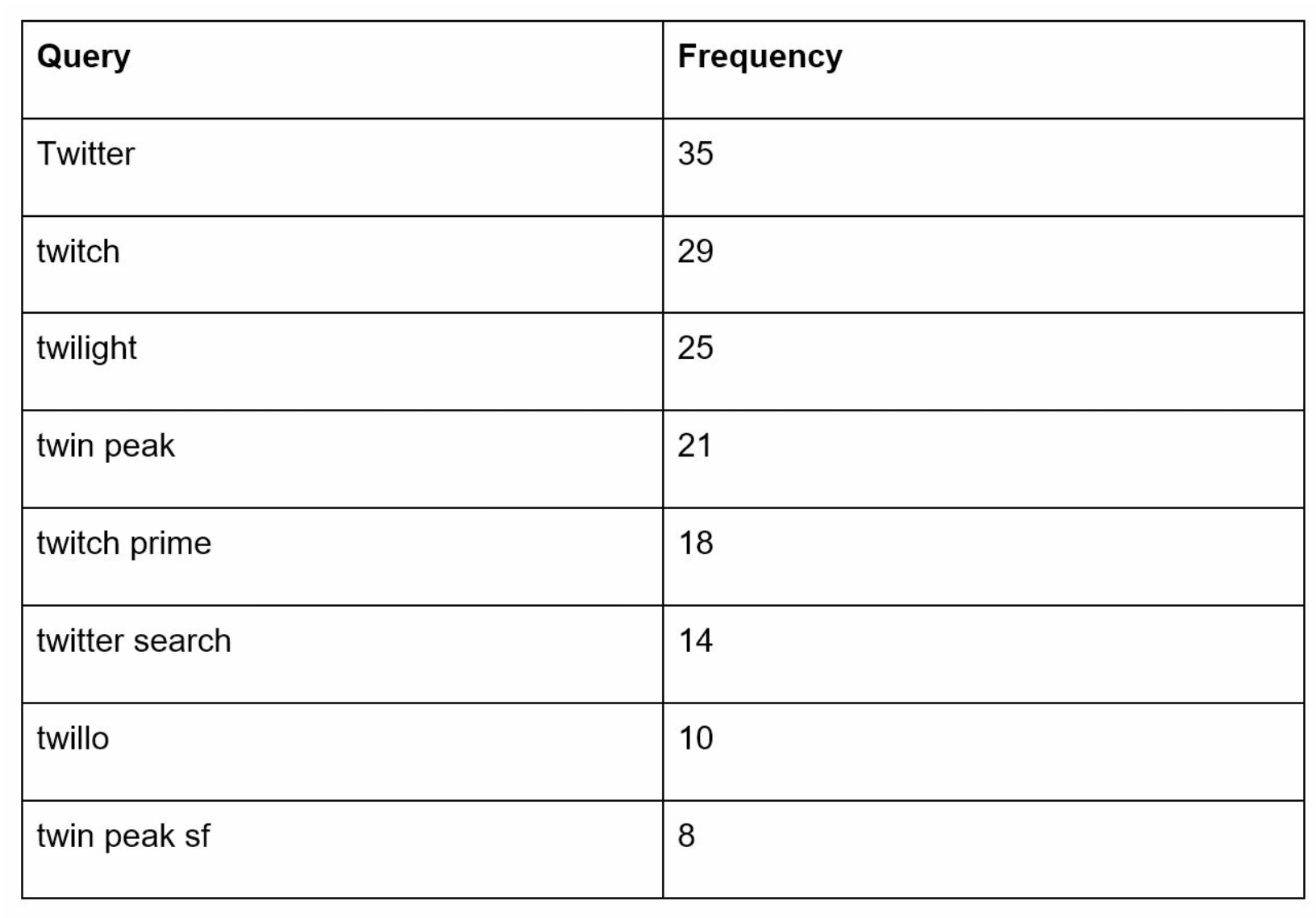
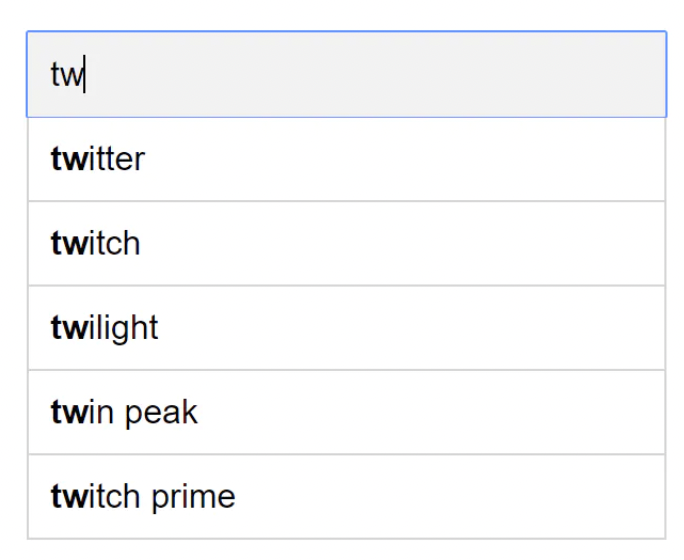
When a user types “tw” in the search box, the following top 5 searched queries are displayed, assuming the frequency table is based on Table.
当用户在搜索框中输入 "tw" 时,假设频率表以表13-1为基础,就会显示以下前5个被搜索的查询(图13-3)。
To get top 5 frequently searched queries, execute the following SQL query:
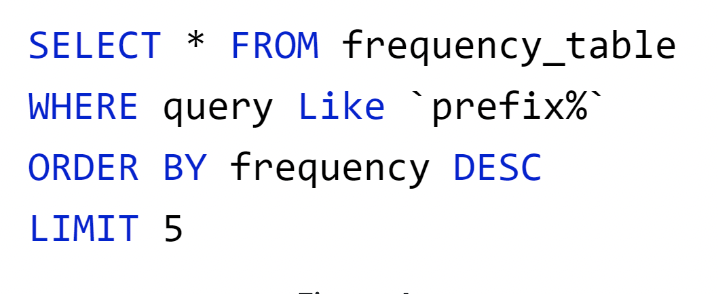
This is an acceptable solution when the data set is small. When it is large, accessing the database becomes a bottleneck. We will explore optimizations in deep dive.
当数据集较小时,这是一个可以接受的解决方案。当它很大时,访问数据库就会成为一个瓶颈。我们将在深入探讨优化问题。
3 Step 3 - Design deep dive
In the high-level design, we discussed data gathering service and query service. The high-level design is not optimal, but it serves as a good starting point. In this section, we will dive deep into a few components and explore optimizations as follows:
- Trie data structure
- Data gathering service
- Query service
- Scale the storage
- Trie operations
在高层次设计中,我们讨论了数据收集服务和查询服务。高层设计并不是最优的,但它是一个很好的起点。在这一节中,我们将深入研究几个组件,并探讨以下的优化方法。
- Trie 数据结构
- 数据收集服务
- 数据查询
- 扩展存储
- Trie 操作
3.1 Trie data structure
Relational databases are used for storage in the high-level design. However, fetching the top 5 search queries from a relational database is inefficient. The data structure trie (prefix tree) is used to overcome the problem. As trie data structure is crucial for the system, we will dedicate significant time to design a customized trie. Please note that some of the ideas are from articles [2] and [3].
Understanding the basic trie data structure is essential for this interview question. However, this is more of a data structure question than a system design question. Besides, many online materials explain this concept. In this chapter, we will only discuss an overview of the trie data structure and focus on how to optimize the basic trie to improve response time.
Trie (pronounced “try”) is a tree-like data structure that can compactly store strings. The name comes from the word retrieval, which indicates it is designed for string retrieval operations. The main idea of trie consists of the following:
- A trie is a tree-like data structure.
- The root represents an empty string.
- Each node stores a character and has 26 children, one for each possible character. To save space, we do not draw empty links.
- Each tree node represents a single word or a prefix string.
Figure shows a trie with search queries “tree”, “try”, “true”, “toy”, “wish”, “win”. Search queries are highlighted with a thicker border.

Basic trie data structure stores characters in nodes. To support sorting by frequency, frequency info needs to be included in nodes. Assume we have the following frequency table.
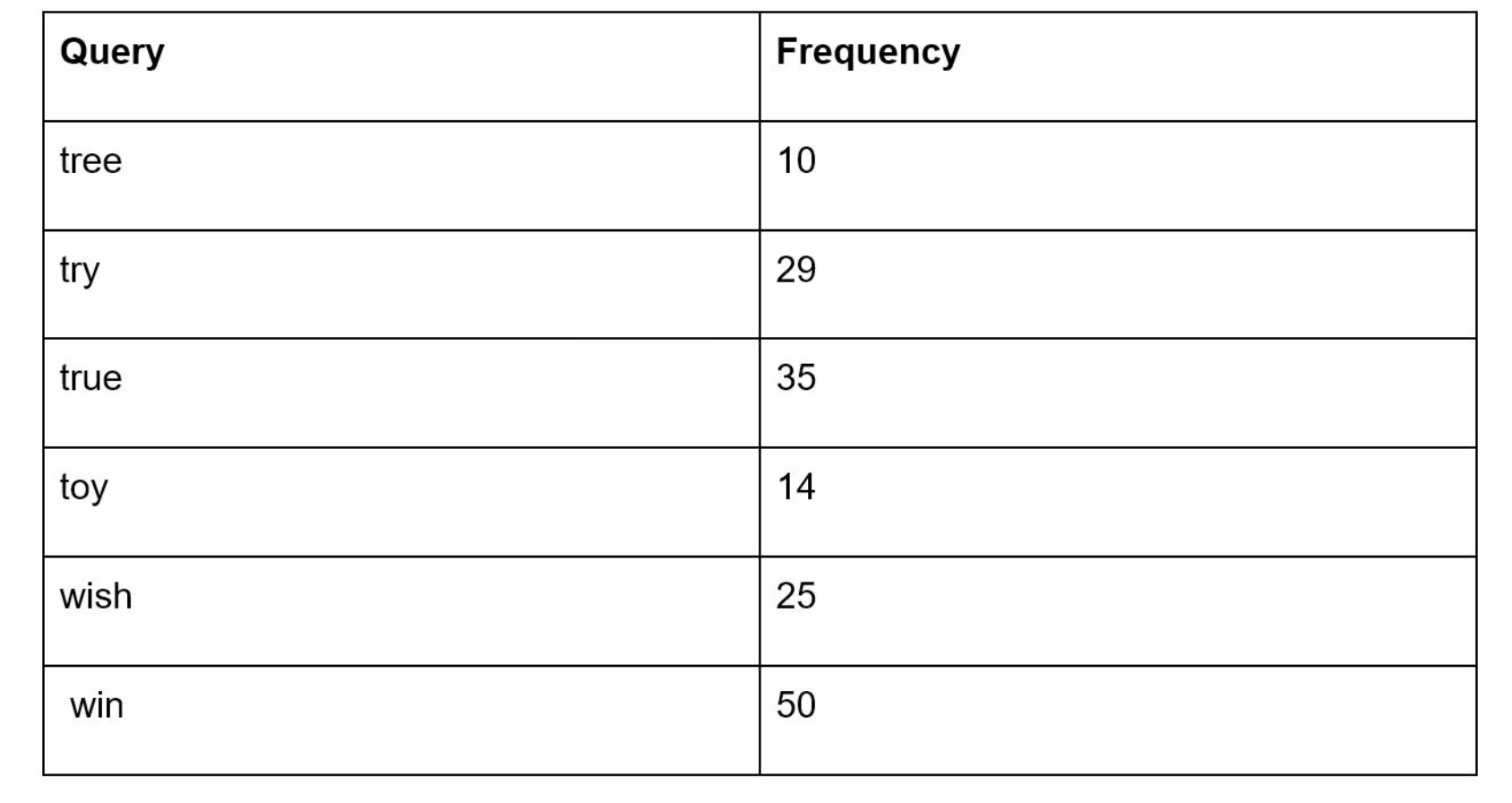
After adding frequency info to nodes, updated trie data structure is shown in Figure.

How does autocomplete work with trie? Before diving into the algorithm, let us define some terms.
-
p: length of a prefix
-
n: total number of nodes in a trie
-
c: number of children of a given node
Steps to get top k most searched queries are listed below:
- Find the prefix. Time complexity: O(p).
-
Traverse the subtree from the prefix node to get all valid children. A child is valid if it can form a valid query string. Time complexity: O(c)
-
Sort the children and get top k. Time complexity: O(clogc)
Let us use an example as shown in Figure to explain the algorithm. Assume k equals to 2 and a user types “tr” in the search box. The algorithm works as follows:
- Step 1: Find the prefix node “tr”
- Step 2: Traverse the subtree to get all valid children. In this case, nodes [tree: 10], [true: 35], [try: 29] are valid.
- Step 3: Sort the children and get top 2. [true: 35] and [try: 29] are the top 2 queries with prefix “tr”

The time complexity of this algorithm is the sum of time spent on each step mentioned above: O(p) + O(c) + O(clogc)
The above algorithm is straightforward. However, it is too slow because we need to traverse the entire trie to get top k results in the worst-case scenario. Below are two optimizations:
- Limit the max length of a prefix
- Cache top search queries at each node
Let us look at these optimizations one by one.
3.2 Limit the max length of prefix
Users rarely type a long search query into the search box. Thus, it is safe to say p is a small integer number, say 50. If we limit the length of a prefix, the time complexity for “Find the prefix” can be reduced from O(p) to O(small constant), aka O(1).
3.3 Cache top search queries at each node
To avoid traversing the whole trie, we store top k most frequently used queries at each node. Since 5 to 10 autocomplete suggestions are enough for users, k is a relatively small number. In our specific case, only the top 5 search queries are cached.
By caching top search queries at every node, we significantly reduce the time complexity to retrieve the top 5 queries. However, this design requires a lot of space to store top queries at every node. Trading space for time is well worth it as fast response time is very important.
Figure shows the updated trie data structure. Top 5 queries are stored on each node. For example, the node with prefix “be” stores the following: [best: 35, bet: 29, bee: 20, be: 15, beer: 10].

Let us revisit the time complexity of the algorithm after applying those two optimizations:
- Find the prefix node. Time complexity: O(1)
- Return top k. Since top k queries are cached, the time complexity for this step is O(1).
As the time complexity for each of the steps is reduced to O(1), our algorithm takes only O(1) to fetch top k queries.
3.3 Data gathering service
In our previous design, whenever a user types a search query, data is updated in real-time. This approach is not practical for the following two reasons:
- Users may enter billions of queries per day. Updating the trie on every query significantly slows down the query service.
- Top suggestions may not change much once the trie is built. Thus, it is unnecessary to update the trie frequently.
To design a scalable data gathering service, we examine where data comes from and how data is used. Real-time applications like Twitter require up to date autocomplete suggestions. However, autocomplete suggestions for many Google keywords might not change much on a daily basis.
Despite the differences in use cases, the underlying foundation for data gathering service remains the same because data used to build the trie is usually from analytics or logging services.
Figure shows the redesigned data gathering service. Each component is examined one by one.
Analytics Logs. It stores raw data about search queries. Logs are append-only and are not indexed. Table shows an example of the log file.
Aggregators. The size of analytics logs is usually very large, and data is not in the right format. We need to aggregate data so it can be easily processed by our system.
Depending on the use case, we may aggregate data differently. For real-time applications such as Twitter, we aggregate data in a shorter time interval as real-time results are important.
On the other hand, aggregating data less frequently, say once per week, might be good enough for many use cases. During an interview session, verify whether real-time results are important. We assume trie is rebuilt weekly.
Aggregated Data.
Table shows an example of aggregated weekly data. “time” field represents the start time of a week. “frequency” field is the sum of the occurrences for the corresponding query in that week.
-
Workers. Workers are a set of servers that perform asynchronous jobs at regular intervals. They build the trie data structure and store it in Trie DB.
-
Trie Cache. Trie Cache is a distributed cache system that keeps trie in memory for fast read. It takes a weekly snapshot of the DB.
-
Trie DB. Trie DB is the persistent storage. Two options are available to store the data:
-
Document store: Since a new trie is built weekly, we can periodically take a snapshot of it, serialize it, and store the serialized data in the database. Document stores like MongoDB [4] are good fits for serialized data.
-
Key-value store: A trie can be represented in a hash table form [4] by applying the following logic:
- Every prefix in the trie is mapped to a key in a hash table.
- Data on each trie node is mapped to a value in a hash table.
Figure shows the mapping between the trie and hash table.

In Figure, each trie node on the left is mapped to the
3.4 Query service
In the high-level design, query service calls the database directly to fetch the top 5 results. Figure shows the improved design as previous design is inefficient.
- A search query is sent to the load balancer.
- The load balancer routes the request to API servers.
-
API servers get trie data from Trie Cache and construct autocomplete suggestions for the client.
-
In case the data is not in Trie Cache, we replenish data back to the cache. This way, all subsequent requests for the same prefix are returned from the cache. A cache miss can happen when a cache server is out of memory or offline.
Query service requires lightning-fast speed. We propose the following optimizations:
-
AJAX request. For web applications, browsers usually send AJAX requests to fetch autocomplete results. The main benefit of AJAX is that sending/receiving a request/response does not refresh the whole web page.
-
Browser caching. For many applications, autocomplete search suggestions may not change much within a short time. Thus, autocomplete suggestions can be saved in browser cache to allow subsequent requests to get results from the cache directly. Google search engine uses the same cache mechanism. Figure shows the response header when you type “system design interview” on the Google search engine. As you can see, Googlecaches the results in the browser for 1 hour. Please note: “private” in cache-control means results are intended for a single user and must not be cached by a shared cache. “max- age=3600” means the cache is valid for 3600 seconds, aka, an hour.

- Data sampling: For a large-scale system, logging every search query requires a lot of processing power and storage. Data sampling is important. For instance, only 1 out of every N requests is logged by the system.
3.5 Trie operations
Trie is a core component of the autocomplete system. Let us look at how trie operations (create, update, and delete) work.
3.5.1 Create
Trie is created by workers using aggregated data. The source of data is from Analytics Log/DB.
3.5.2 Update
There are two ways to update the trie.
Option 1: Update the trie weekly. Once a new trie is created, the new trie replaces the old one.
Option 2: Update individual trie node directly. We try to avoid this operation because it is slow. However, if the size of the trie is small, it is an acceptable solution. When we update a trie node, its ancestors all the way up to the root must be updated because ancestors store top queries of children. Figure shows an example of how the update operation works. On the left side, the search query “beer” has the original value 10. On the right side, it is updated to 30. As you can see, the node and its ancestors have the “beer” value updated to 30.

3.5.3 UpdateDelete
We have to remove hateful, violent, sexually explicit, or dangerous autocomplete suggestions. We add a filter layer (Figure) in front of the Trie Cache to filter out unwanted suggestions. Having a filter layer gives us the flexibility of removing results based on different filter rules. Unwanted suggestions are removed physically from the database asynchronically so the correct data set will be used to build trie in the next update cycle.

The database is asynchronously updated to remove hateful content.
3.5.4 Scale the storage
Now that we have developed a system to bring autocomplete queries to users, it is time to solve the scalability issue when the trie grows too large to fit in one server.
Since English is the only supported language, a naive way to shard is based on the first character. Here are some examples.
- If we need two servers for storage, we can store queries starting with ‘a’ to ‘m’ on the first server, and ‘n’ to ‘z’ on the second server.
- If we need three servers, we can split queries into ‘a’ to ‘i’, ‘j’ to ‘r’ and ‘s’ to ‘z’.
Following this logic, we can split queries up to 26 servers because there are 26 alphabetic characters in English. Let us define sharding based on the first character as first level sharding. To store data beyond 26 servers, we can shard on the second or even at the third level. For example, data queries that start with ‘a’ can be split into 4 servers: ‘aa-ag’ ‘ah-an’, ‘ao-au’, and ‘av-az’.
At the first glance this approach seems reasonable, until you realize that there are a lot more words that start with the letter ‘c’ than ‘x’. This creates uneven distribution.
To mitigate the data imbalance problem, we analyze historical data distribution pattern and apply smarter sharding logic as shown in Figure 13-15. The shard map manager maintains a lookup database for identifying where rows should be stored. For example, if there are a similar number of historical queries for ‘s’ and for ‘u’, ‘v’, ‘w’, ‘x’, ‘y’ and ‘z’ combined, we can maintain two shards: one for ‘s’ and one for ‘u’ to ‘z’.

4 Step 4 - Wrap up
After you finish the deep dive, your interviewer might ask you some follow up questions.
Interviewer: How do you extend your design to support multiple languages?
To support other non-English queries, we store Unicode characters in trie nodes. If you are not familiar with Unicode, here is the definition: “an encoding standard covers all the characters for all the writing systems of the world, modern and ancient” [5].
Interviewer: What if top search queries in one country are different from others?
In this case, we might build different tries for different countries. To improve the response time, we can store tries in CDNs.
Interviewer: How can we support the trending (real-time) search queries?
Assuming a news event breaks out, a search query suddenly becomes popular. Our original design will not work because:
-
Offline workers are not scheduled to update the trie yet because this is scheduled to run on weekly basis.
-
Even if it is scheduled, it takes too long to build the trie.
Building a real-time search autocomplete is complicated and is beyond the scope of this book so we will only give a few ideas:
- Reduce the working data set by sharding.
- Change the ranking model and assign more weight to recent search queries.
- Data may come as streams, so we do not have access to all the data at once. Streaming data means data is generated continuously. Stream processing requires a different set of systems: Apache Hadoop MapReduce [6], Apache Spark Streaming [7], Apache Storm [8], Apache Kafka [9], etc. Because all those topics require specific domain knowledge, we are not going into detail here.
Congratulations on getting this far! Now give yourself a pat on the back. Good job!
Reference materials
[1] The Life of a Typeahead Query: https://www.facebook.com/notes/facebook-engineering/the-life-of-a-typeahead-query/389105248919/
[2] How We Built Prefixy: A Scalable Prefix Search Service for Powering Autocomplete:
https://medium.com/@prefixyteam/how-we-built-prefixy-a-scalable-prefix-search-service-for-powering-autocomplete-c20f98e2eff1
[3] Prefix Hash Tree An Indexing Data Structure over Distributed Hash Tables: https://people.eecs.berkeley.edu/~sylvia/papers/pht.pdf
[4] MongoDB wikipedia: https://en.wikipedia.org/wiki/MongoDB
[5] Unicode frequently asked questions: https://www.unicode.org/faq/basic_q.html
[6] Apache hadoop: https://hadoop.apache.org/
[7] Spark streaming: https://spark.apache.org/streaming/
[8] Apache storm: https://storm.apache.org/
[9] Apache kafka: https://kafka.apache.org/documentation/